



Show Variants on Collection
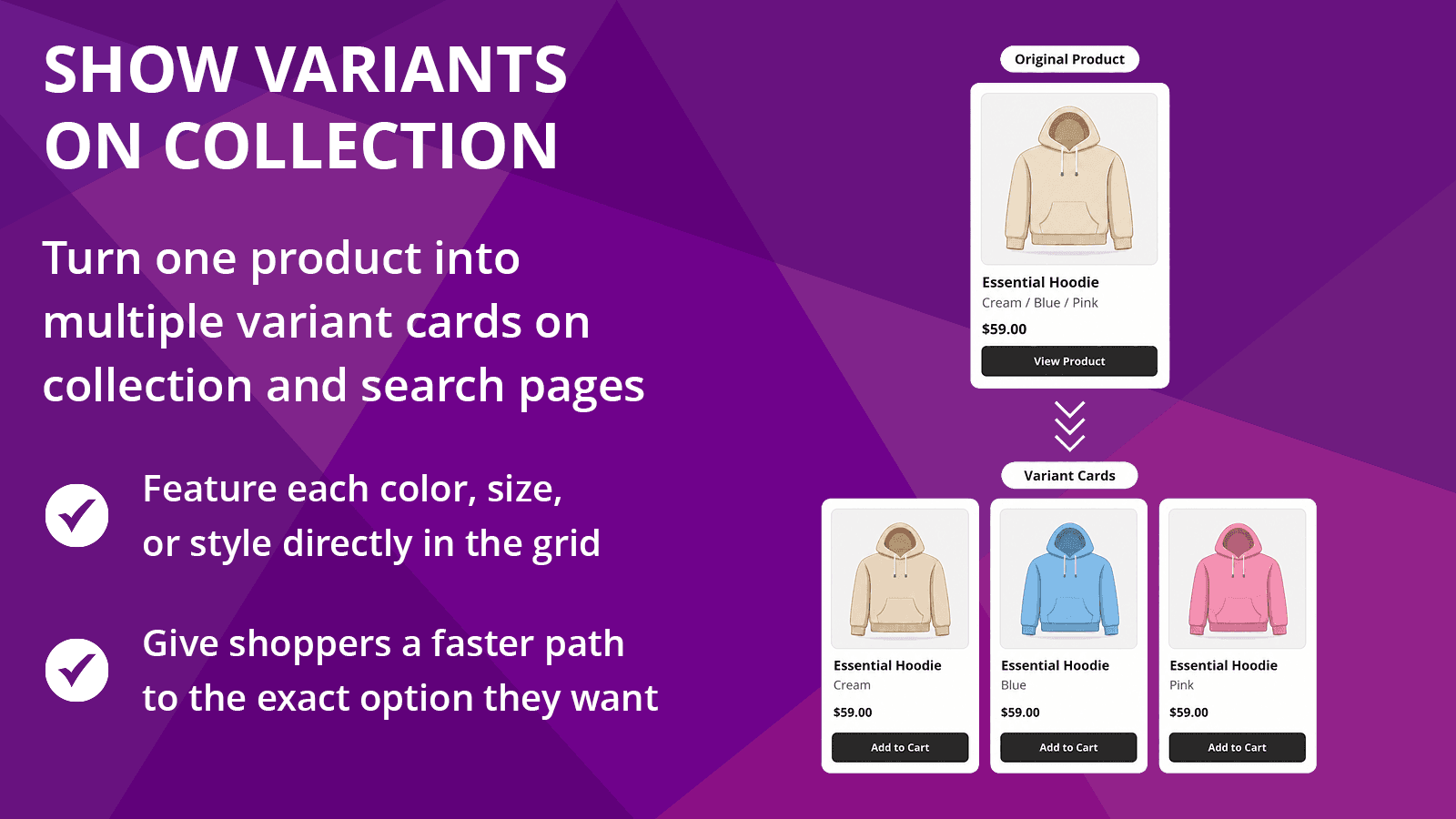
Display variants as separate product cards on collection and search pages. Help shoppers find colors, sizes, styles, and other options faster.


Introduction
Show variants as separate products. Help shoppers find the right option faster.
Overview
Give shoppers a clearer way to browse product options before they reach the product page. Show Variants on Collection helps merchants make colors, sizes, styles, materials, and other variants easier to discover across collection pages and search results. Use simple display rules to control where variant cards appear, help customers find the right option faster, and create a cleaner browsing experience across your storefront.
Features
- Show product variants as separate products on collection and search pages
- Split variants by color, size, style, material, or other product options
- Choose which collections, products, or tags should display variant cards
- Hide sold-out variants or variants without dedicated images on collection pages
- Customize variant card titles so shoppers can see the selected option clearly
FAQ
Frequently asked questions about Show Variants on Collection.
No. Show Variants on Collection changes how qualifying variants are displayed on your storefront. It does not rewrite your Shopify products, variants, collections, prices, inventory, images, or options.
You can choose the option names that matter for your store, such as Color, Colour, Size, Style, Material, or another option name you use in Shopify. The app looks for matching option names and displays qualifying variants as separate cards.
Yes. You can control where variant cards appear using collection and product tag targeting. The paid plan supports broader production use, while the Free plan is intentionally limited for previewing the app.
Yes, search results support is included for paid-plan stores. This lets matching variant cards appear on storefront search results as well as collection pages.
Yes. The app includes a setting to hide sold-out variants on collection pages so shoppers are not shown unavailable options when browsing.
Yes. You can hide variants without dedicated images. This is useful when you only want variant cards to appear when each option has a clear visual representation.
The app includes title-format controls so merchants can show the product title with the selected option value. This helps shoppers understand which color, size, style, or other option they are viewing before opening the product page.
The app is designed for Online Store 2.0 themes and focuses on theme-safe storefront behavior. Some themes structure product grids differently, so theme compatibility can vary. If something does not display correctly, contact support with your theme name and an example page.
Yes. Variant cards are designed to link shoppers to the appropriate product and selected variant context so they can continue shopping from the option they clicked.
The Free plan is meant for previewing the app with limited storefront use. The Starter plan is the production plan for merchants who want the full core app experience, including broader targeting and search results support.
Changelog
Latest updates for Show Variants on Collection.
Improved
- Updated Shopify Admin API compatibility to maintain support for Shopify’s platform requirements.
- Refreshed core application dependencies to improve security, stability, and ongoing compatibility.
Fixed
- Strengthened safeguards for app settings access and authentication redirects.
Notes
- No changes to storefront variant behavior, merchant settings, targeting rules, or subscription features. No merchant action is required.
Improved
- Refined Free plan messaging so plan limits are clearer before setup.
- Updated product presentation materials to better explain how variant cards work across collections, search results, targeting, title formats, and visibility rules.
- Added final launch-support materials to make the app easier to review, test, and maintain.
Improved
- Improved production readiness for Free and Starter plan storefront behavior.
- Confirmed Starter plan support for splitting variants across collection pages and search results.
- Verified collection-page filtering for sold-out variants and variants without dedicated images.
- Completed additional billing-flow validation for plan upgrades, monthly-to-yearly switching, trial carryover, and returning to the Free plan.
- Improved production deployment validation for Shopify-hosted storefront extension assets.
- Confirmed production app setup, including app install flow, onboarding to Plans, Billing Test behavior, and production database connectivity.
Added
- Added Starter plan support for showing variant cards on search results pages.
- Added Free plan gating for search results support, so search pages remain a Starter feature while Free stores can continue previewing variant cards on one selected collection.
- Added storefront runtime safeguards so search results support stays disabled for Free stores, even if search settings were previously enabled while on a paid plan.
- Added clearer Home page App Status indicators for Variant Cards, Current Plan, and Search Results Pages.
- Added plan cadence visibility on the Home page, so Starter subscriptions display as Starter Monthly or Starter Yearly.
Improved
- Improved search results processing so variant cards can display more reliably across different Shopify theme structures.
- Improved search results compatibility with themes that reuse predictive-search wrappers on standard search pages.
- Improved search results handling for lazy-rendered product cards, sold-out products, skipped cards, and theme-rendered sold-out badges.
- Improved compatibility testing across multiple Shopify themes, including Dawn, Sleek, Impulse, Impact, Empire, Prestige, and Symmetry.
- Improved the Getting Started page with clearer setup steps, better SVC-specific guidance, improved action buttons, bold numbered steps, and helpful internal page links.
- Improved the Home page with clearer app positioning, stronger setup guidance, useful App Status indicators, and a more polished dashboard-style layout.
- Improved Home page visual hierarchy with light-gray section backgrounds, sharper status-card contrast, stronger dividers, and a subtle iazo purple review prompt background.
- Improved Quick Links on the Home page with cleaner navigation order and consistent iazo link styling.
- Improved the Settings page subsection navigation with better mobile wrapping, cleaner pill-style buttons, and primary-button color styling.
- Improved the mobile menu with clearer iazo branding, active-page styling, better touch-friendly states, and more balanced color usage.
- Improved Settings page readability by standardizing helper text colors and strengthening divider lines between grouped settings.
- Improved Plans page helper text and billing-period labels for better readability.
- Updated the internal roadmap to remove completed search work and better reflect future plan-tier packaging.
Fixed
- Fixed cases where search result product cards could fail to split in themes that wrap search results inside predictive-search or menu-like containers.
- Fixed search-results behavior where sold-out product cards could remain partially visible, lose images, or fail to be removed correctly when Hide Sold-Out Variants was enabled.
- Fixed theme-specific sold-out badge detection by improving how the app detects badges rendered outside the initial card element.
- Fixed Free plan downgrade behavior so search results support is turned off in Settings and does not run on storefront search pages.
- Fixed Home page numbered-list styling so setup step numbers display more clearly.
- Fixed Settings subsection navigation hover, active, and focus behavior so the pills now match the app’s primary button styling.
- Fixed faint divider lines on the Home and Settings pages that were difficult to see against light backgrounds.
Added
- Added a limited Free plan so merchants can preview Show Variants on Collection on one selected collection before upgrading.
- Added Free-plan gating across Settings and storefront behavior.
- Added one-collection preview limits for Free users.
- Added full collection targeting access for Starter users.
- Added clear upgrade messaging for paid-only controls.
- Added paid-plan support for splitting variant cards on storefront search results pages.
- Added a new Settings subsection: Additional Storefront Locations.
- Added a Search results pages toggle for Starter users.
- Added more reliable Free and Starter plan enforcement across the app.
- Added onboarding copy explaining that merchants start on the Free plan by default.
- Added a theme compatibility note to onboarding with a direct Support button.
Improved
- Redesigned the Plans page pricing area into a more cohesive Free + Starter pricing module.
- Updated Plans page language from “Current Subscription” to “Current Plan” so the Free plan is represented correctly.
- Removed “Free” from paid trial wording to avoid confusion between the Free plan and the seven (7)-day paid-plan trial.
- Updated paid-plan CTAs and success messaging for a clearer Free-to-Starter flow.
- Improved success banner timing so Plans page success messages remain visible long enough to read.
- Improved Settings locked-state messaging for Free users, including Product Tags, Matching Logic, and Search support.
- Improved variant image accuracy on search results pages.
- Improved sold-out handling for grouped variants so color/option groups only hide when all variants in that group are sold out.
- Improved no-image handling for grouped variants so option groups remain visible when at least one variant has a valid dedicated image.
- Improved compatibility with themes that animate product cards into view.
Fixed
- Fixed an issue where a partially sold-out option group could incorrectly hide the wrong variant card.
- Fixed an issue where fully filtered products could remain visible as the original unsplit product card.
- Fixed an issue where search result cards could all appear with the same/default product image instead of variant-specific images.
- Fixed an issue where some available products could be incorrectly hidden on search results pages.
- Fixed an issue where fully sold-out search results could still split when the rendered theme card clearly showed a Sold out state.
- Fixed a theme compatibility issue where some search result cards could remain hidden after loading.
- Fixed Plans page success banners that could disappear too quickly or fail to auto-dismiss consistently.
- Fixed legacy billing copy that implied merchants had no usable plan when they were actually on the Free plan.
Improved
- Expanded storefront theme compatibility across a wider range of Shopify theme structures.
- Improved product-card detection so variant cards more reliably inherit the correct layout, spacing, image area, title area, price area, and product links.
- Improved grid handling for themes that use custom product card wrappers, nested grid slots, slideshow containers, and dynamic product-list structures.
- Improved title handling across additional product card layouts so variant card titles follow the selected title format more consistently.
- Improved variant image handling for themes that use primary/secondary image layers, lazy-loaded images, responsive image placeholders, and reveal animations.
- Improved support for paginated and dynamically loaded product grids where compatible with the theme’s storefront behavior.
- Improved diagnostic logging to make theme compatibility issues easier to identify and resolve.
Fixed
- Fixed cases where variant cards could render as image-only blocks instead of full product cards.
- Fixed cases where product card images and titles could become mismatched after splitting.
- Fixed cases where variant card images could appear blank because of theme lazy-loading, reveal animations, or responsive image overlays.
- Fixed cases where visible card titles did not update even though hidden accessibility titles were updated.
- Fixed several theme-specific layout edge cases where variant cards did not fill grid positions correctly or appeared out of order.
Notes
- Theme compatibility has been significantly expanded, but some theme-native Quick Add, Quick View, or infinite-scroll behaviors may still vary by theme. If variant cards do not display as expected, please contact support and include your Support Details so we can review the theme structure.
Improved
- Improved theme compatibility for variant cards across more premium Shopify themes.
- Improved product-card detection so variant cards are more likely to inherit the correct theme layout, spacing, images, pricing, and quick-action areas.
- Improved title handling across additional theme card structures so variant card titles follow the selected title format more reliably.
- Improved variant links and quick-view behavior so split variant cards more consistently point shoppers to the correct variant.
- Improved Support Details with clearer theme information to make storefront/theme troubleshooting easier.
- Added clearer storefront diagnostic support to help identify theme-specific compatibility issues faster.
- Added a settings note to help merchants manage theme hover images when a theme’s secondary hover image does not match the displayed variant card.
Fixed
- Fixed compatibility issues where some themes could split image sliders or image wrappers instead of the full product card.
- Fixed issues where product titles did not update correctly in certain theme card layouts.
- Fixed quick-view behavior in supported theme structures so popup actions can better preserve the selected variant from the card.
- Fixed several theme-specific layout edge cases discovered during broader storefront testing.
Improved
- Improved variant splitting logic so products now split by the first matching option in product order when multiple option names are selected.
- Improved handling of option name variations, including plural forms such as “Color” and “Colors.”
- Improved settings updates so storefront changes apply immediately after saving, without waiting for cache delays.
- Improved collection and product tag targeting accuracy, including more consistent OR / AND matching behavior.
- Improved compatibility with modern Shopify themes and custom product-card layouts.
- Improved variant card placement so split cards are inserted at the correct collection-grid level for more consistent layouts.
- Improved title formatting support so Variant Title Format and Separator settings apply more reliably across supported themes.
- Improved visible title handling for themes that render product-card titles in multiple places or non-standard title layers.
- Improved support for dynamic collection updates, including sorting, filtering, and infinite scroll.
- Improved reprocessing behavior so newly loaded or replaced collection-grid cards can split correctly without creating duplicate variant cards.
- Improved storefront diagnostics for theme compatibility testing and support troubleshooting.
Fixed
- Fixed an issue where storefront setting changes could take up to a minute to appear.
- Fixed cases where variant cards could fail to appear or render incorrectly in certain theme card layouts.
- Fixed cases where Variant Title Format and Separator settings did not apply correctly.
- Fixed an issue where some themes could continue showing the original product title instead of the configured variant card title.
- Fixed an issue where changing the collection sort order could prevent variant cards from splitting again until the page was refreshed.
- Fixed dynamic grid handling so variant cards continue working after collection filters, sort changes, and infinite scroll updates.
- Fixed compatibility issues caused by product cards appearing in menu, navigation, or non-collection-grid contexts.
Notes
- These improvements make the app more reliable across a wider range of Shopify themes and storefront configurations.
- No merchant action is required. Updates apply automatically.
Improved
- Improved reliability of variant display on collection pages across different themes
- More consistent behavior when loading and updating variant cards
- Better handling of product option formats to ensure accurate variant grouping
Fixed
- Fixed an issue where variants would not appear on some stores or themes
- Fixed cases where variant cards failed to load due to configuration or environment differences
- Fixed edge cases where certain product option formats could prevent variants from displaying correctly
Added
- Added flexible display controls for choosing which option names create variant cards.
- Added targeting controls for applying variant cards across all collection pages or only selected collections and product tags.
- Added inclusion and exclusion controls for collections and product tags.
- Added matching logic controls for combining collection and product tag targeting.
- Added manual entry support for option names and product tags when needed.
- Added card title format options with visual examples.
- Added a title separator setting for supported title formats.
- Added card image source controls for choosing between variant images and the default product image.
Improved
- Improved Settings organization with clearer section names, descriptions, and guidance throughout.
- Improved targeting setup with more step-by-step explanations for how collection and product tag rules work.
- Improved card configuration with clearer formatting and image controls.
- Improved Home page navigation with faster access to Settings and Getting Started.
Fixed
- Fixed storefront split behavior so the new targeting rules now control where variant cards appear on collection pages.
- Fixed collection matching so selected collection rules work more reliably on storefront pages.
- Fixed title and image settings persistence so changes save and reload correctly.
Added
- Added Storefront Status to help show whether the required theme embed is active on the current theme.
- Added setup guidance when the embed is not yet active.
Improved
- Improved setup clarity by distinguishing between active, inactive, and not-added embed states.
- Improved the Settings experience by showing activation instructions only when they are needed.
- Improved theme embed detection for more accurate storefront setup feedback.
Fixed
- Fixed embed-status detection so the app more reliably reflects the current theme embed state.
Added
- Added a new Storefront Status section near the top of Settings.
- Added guidance to help merchants understand that the theme app embed must be enabled for storefront behavior to work.
- Added a sticky save bar that appears when settings have unsaved changes.
Updated
- Updated Settings UX with clearer save behavior and dirty-state handling.
- Updated the Theme / Compatibility section for a cleaner setup flow.
- Updated the theme editor app embed label to Variants on Collection for clearer merchant-facing language.
Added
- Added a structured Settings page for configuring how variants will be displayed on collection pages.
- Added grouped settings sections for display rules, collections, card content, visibility, theme compatibility, and save status.
- Added persistent app settings so configuration is saved and reloaded reliably.
- Added a lightweight “Last saved” status indicator to improve settings confidence.
Updated
- Updated the app shell and navigation to support the new Settings workflow.
- Updated toggle styling so disabled/off states remain clearly visible.
- Updated internal settings infrastructure to support Show Variants on Collection cleanly.
Removed
- Removed legacy product-specific settings and backend residue from the previous product surface to keep the app foundation clean and focused.
Added
- Established the app from a stable internal baseline.
- Set up the development environment, app configuration, and isolated database for Show Variants on Collection.
Updated
- Rebranded the app shell to Show Variants on Collection.
- Removed visible references to the previous product surface while preserving shared app infrastructure.
- Prepared the app shell for upcoming feature development.
Added
- Initial repository created for Show Variants on Collection.